List your fest on Fests & events
Updated
Put an organisation's event on Fests & events, where anyone can find it by city, date and type.
- Step 1: Open Public listing and choose the event.
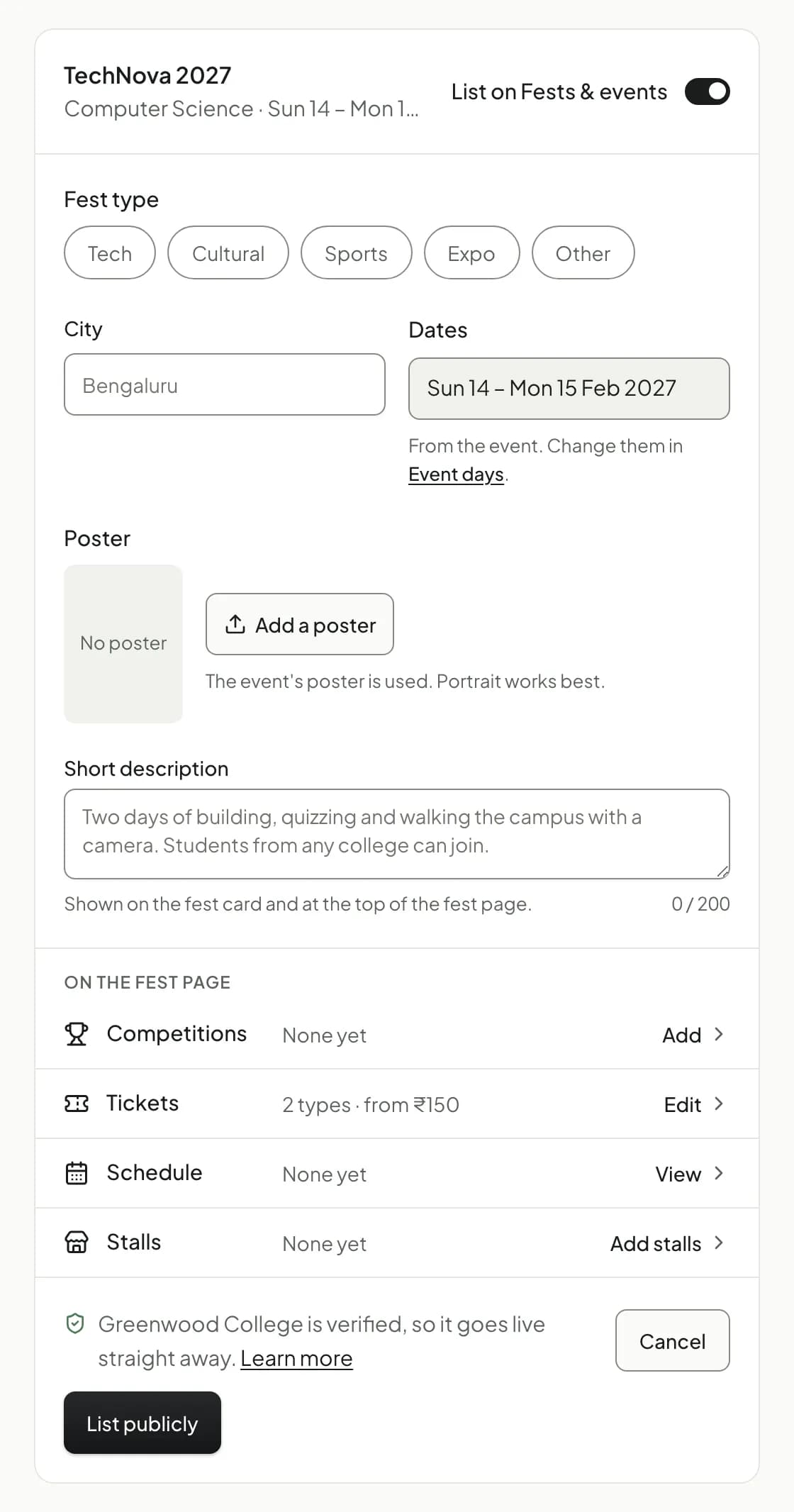
- Step 2: Turn on List on Fests & events. Pick the fest type, then add the city, a poster and a Short description. The dates come from the event.
- Step 3: Tap Send for review for your first listing. Once one has been live, a verified organisation taps List publicly.
- Step 4: Your organisation's first listing shows In review · usually within a day until our team checks it, verified or not. After that, a verified organisation's listings go live straight away.
- Step 5: To take it off, tap Unlist and confirm. List again puts it back.
TipUnlisting keeps the event and its registrations working. Tickets already sold stay valid, and ticket holders can still open the fest page from its link.
If a listing is Not approved, read the note from InstantPix, fix it, and tap Edit and resend. If it's Taken down, InstantPix removed it, and only InstantPix can restore it (Contact support). A live listing relists without a second review. Org admins and unit admins can list. Coordinators can't.
Related
Still stuck? Contact us